Skincare and Face Care Routine
Rstream LabsBeauty
4.464.00 Reviews
- Version
- 3.0.656
- Installs
- 5.00M
- Age Rating
- Teen
Screenshots


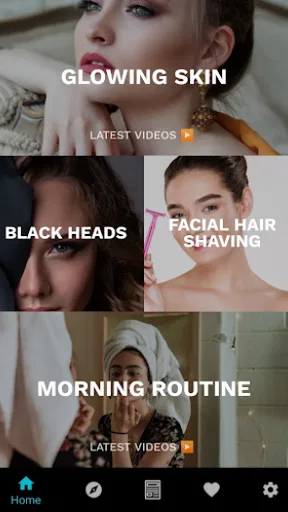
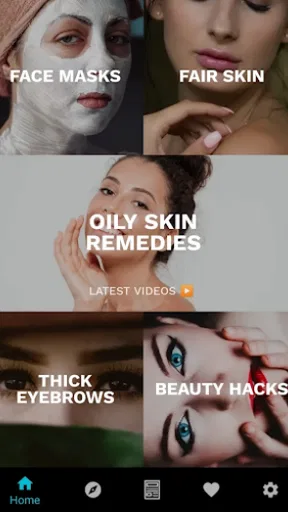

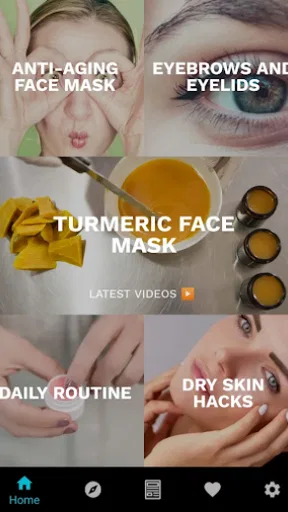

Our Review of Skincare and Face Care Routine
 Analysis by Appyee
I tend to think of a skincare app as a companion for decisions I make away from the screen: what to do after washing my face, how to keep a new routine manageable, and what an unfamiliar ingredient is meant to do. That is the practical promise of Skincare and Face Care Routine, a free beauty app from Rstream Labs. Its focus is guidance and daily care rather than replacing a dermatologist or turning skincare into a shopping task. The app is aimed at teens and older users, and its 4.3 average from around 25,000 ratings suggests it has found an audience among people looking for approachable routine support.
When the connection becomes part of the routine
Connectivity matters most when I want to look something up or revisit guidance at the moment I’m making a choice. An ingredient explanation is useful while comparing two moisturizers, and routine advice is easier to act on when it is close at hand. That makes the app feel most valuable as a reference and learning tool: I can use it to slow down and understand a step instead of relying on a quick guess.
I would treat network access as part of the experience rather than assume every section will be available in every situation. If I’m planning a routine before leaving home, I can review what I need then; if I’m standing in a shop with a weak signal, I wouldn’t make an important skincare decision depend on opening a page instantly. This is a small but useful habit with any connected beauty guide: check the advice when it is convenient, then keep the routine itself simple enough to remember.
At home, on the move, and between steps
The app’s subject suits short visits throughout the day. A morning check can help me remember the order of a routine, while a calmer evening moment is better for reading about an ingredient or thinking through whether a change is worth making. I would not try to research every product while rushing through a bathroom routine. The more useful approach is to learn one thing at a time and bring only the relevant takeaway into the next day.
A realistic use case is someone who has bought a new face wash and wants to avoid changing several products at once. They can use the app’s educational material to understand what ingredients are intended to do, then keep the rest of their routine steady while they observe how their skin responds. That is a more careful workflow than adding multiple new steps because a recommendation sounds appealing. The app can help organize thinking, but patience and attention to personal reactions still matter.
Keeping advice useful when things go wrong
Any mobile guide can be interrupted by a dropped connection, a low battery, or simply not having time to read. I’d avoid making the app the only record of a routine I’m trying to follow. A brief note in a place I can reach easily—such as the names of products and the order I use them—makes it easier to resume without depending on memory or reopening several screens. This is especially helpful when I’m testing one change and want to know what else stayed the same.
It is also worth separating general educational guidance from personal medical advice. If a product causes a strong reaction or a skin concern persists, an app’s explanations are not a substitute for professional care. I see the best role for this kind of tool as helping me ask better questions and understand routine basics, not diagnosing a condition or promising a particular result.
Making sensible use of mobile data
For data-conscious use, I’d save longer reading for a reliable connection and keep quick routine checks brief. That is a sensible approach whenever an app contains articles or other material that may need to load, and it avoids using mobile data just because I opened the app out of habit. I also wouldn’t upload or enter more personal detail than I need to get value from a routine guide; being selective is a good general practice with any beauty app.
The app is free to download, with optional in-app purchases ranging from under a dollar to around sixty dollars per item. I’d explore the basic experience first and consider a purchase only if I understand what it adds and know I’ll use it. That keeps the app’s role clear: it should make everyday care easier to think through, not pressure me into spending or expanding a routine that already works.
The First Impression
Upon downloading the app, I was immediately struck by its sleek and intuitive interface. It’s clear that the developers put a lot of thought into the user experience. The homepage greets you with calming colors and easy navigation, making it a joy to use right from the start. It feels like a breath of fresh air compared to the cluttered interfaces of some other beauty apps.
Getting Started
Setting up your profile is a breeze. The app asks a series of questions about your skin type, concerns, and current routine. I appreciated the detail here—they even ask about environmental factors like pollution levels in your area. This personalization is what sets the app apart from others. It’s like having a tailor-made skincare plan in your pocket.
That setup is most useful when I answer with the routine I actually follow, not the one I hope to follow. If I claim to use several products every day but usually skip half of them, the suggestions may feel less practical than a simpler starting point. I’d begin with the concerns and habits that shape my real mornings and evenings, then revisit my choices only when something meaningfully changes. This keeps personalization grounded in what I can maintain.
Diving Into Features
One of the standout features of the app is its personalized routine generator. Based on your profile, the app suggests a daily routine complete with products suited to your skin's unique needs. I loved how it wasn't just about recommending products but also explained why each step was essential. This is perfect for skincare newbies and seasoned pros alike.
The routine guidance is most helpful as a structure, not a rulebook. Skin can react differently from person to person, and a suggested sequence cannot account for every preference, sensitivity, or clinician’s instruction. I’d use the explanations to understand the purpose of a step, then leave out anything that does not fit my needs. For someone who already has a routine that is working, the generator may be more useful for checking the logic behind it than for replacing it wholesale.
The app also includes a comprehensive ingredient dictionary. Ever been stumped by a list of ingredients on your moisturizer? Not anymore. This feature breaks down each ingredient’s purpose and benefits, so you know exactly what you’re putting on your skin. It’s like having a skincare encyclopedia at your fingertips.
I find an ingredient reference most useful when I look up one item at a time and connect the explanation to a product I already own. That gives me a better chance of understanding why an ingredient appears in a cleanser or cream without treating a single ingredient as a guarantee of results. It can also help me notice when two products seem to serve a similar purpose, which is a practical way to avoid building a crowded routine just because each item sounds promising.
Tracking Progress
Another feature I found incredibly useful was the progress tracker. You can log changes in your skin over time, and the app uses this data to tweak your routine as needed. It’s both fascinating and empowering to see how your skin evolves, and the app makes it easy to stay on top of your goals.
To get meaningful value from tracking, I’d keep entries consistent and avoid changing several parts of my routine at once. A short note about a change, when it began, and how my skin felt can be more informative than trying to record every detail. It also helps to be realistic about what a tracker can show: skin changes are not always caused by the latest product, and a log is a way to notice patterns rather than proof of cause. People who dislike regular logging may find a simple paper note easier to maintain.
Choosing the right kind of skincare helper
Compared with the usual alternatives, this app sits between a basic checklist and a product-focused beauty community. A handwritten routine is faster and works without opening an app, but it will not explain unfamiliar ingredients or offer the same guided learning. General web searches provide more breadth, yet advice can be scattered and difficult to apply consistently. This app’s appeal is having routine guidance, educational material, and progress reflection in one place, while the trade-off is that it still calls for the user to judge what applies to their own skin.
I’d recommend it most to someone who feels overwhelmed by skincare terminology, wants help forming a repeatable routine, or likes having a place to reflect on changes. It may be less useful to someone who already follows clinician-directed care and does not want additional suggestions, or to a person who prefers not to use a phone as part of a personal-care habit. It is also not the right tool for diagnosing a skin condition; persistent or severe concerns call for professional advice rather than more app browsing.
Community and Support
The app also fosters a strong community vibe. There’s a section where users can share tips, tricks, and product recommendations. It feels like a virtual support group, full of people who are just as passionate about skincare as you are. Plus, the expert articles and Q&A sessions are fantastic for learning new techniques and trends.
I’d treat community recommendations as conversation starters rather than personalized instructions. A product that suits one person may not suit another, and confident personal stories do not carry the same weight as qualified medical guidance. The useful part is seeing the questions other skincare users are asking and picking up ideas to investigate further. I’d be selective about what I share there as well, keeping personal details limited to what is genuinely needed for a discussion.
What to expect from the current app
The app launched in 2019 and is currently at version 3.0.550, with more than five million installs. Those figures tell me it has had a broad reach, but they do not change the basic way I’d judge it: does its guidance make my routine clearer without encouraging unnecessary complexity? I would start with the free experience, take time to understand the suggestions, and avoid treating popularity as evidence that every recommendation will fit me.
It is designed for users aged 13 and older, so younger teens should still involve a parent or trusted adult when making decisions about products or sharing personal information. For anyone, the most sensible expectation is educational support and organization—not guaranteed skin results. The app can help make a routine easier to understand, but what works in real life depends on the person, the products, and consistent, careful use.
Final Thoughts
Overall, the Skincare and Face Care Routine app is a game-changer in the world of digital beauty. It combines personalization, education, and community to create a holistic skincare experience. Whether you're just starting your skincare journey or looking to refine your regimen, this app is a must-try.
With its user-friendly design and comprehensive features, it’s more than just an app—it’s your new skincare best friend. So why not give it a go? Your skin will thank you.
My connectivity verdict
Connectivity is a practical consideration, not the main reason I’d choose this app. I’d use a dependable connection for exploring its learning and community areas, and keep a simple version of my routine in mind for rushed moments or unreliable reception. That approach lets the app support a habit without making the habit depend on a screen being available every time.
My overall recommendation is measured: try it if you want an approachable way to learn skincare basics and organize your thinking, especially if you are starting from scratch. Keep your routine modest, use the tracker only if it genuinely helps, and check recommendations against your own needs. For me, its strongest value is not a promise of perfect skin; it is having a more thoughtful way to decide what deserves a place in an everyday routine.
Verdict
Strengths of Skincare and Face Care Routine
- User-friendly interface, easy navigation.
- Customizable routines for all skin types.
- In-depth ingredient analysis provided.
- Daily reminders for consistent skincare.
- Access to dermatologist-approved tips.
Limitations of Skincare and Face Care Routine
- Limited free features, many locked behind paywall.
- Occasional app crashes on older devices.
- Requires internet for most functionalities.
- Some tips are region-specific, not universal.
- No support for multi-profile management.
Other Releases by Rstream Labs
View All
Learn to Draw Anime by Steps
Art & Design4.6

Learn Drawing
Art & Design4.6

Keto Recipes : Keto Diet App
Food & Drink4.3

Anime App - Watch Anime Series
Comics4.5
Similar Picks in This Category
View All
Beauty Makeup Editor & Camera
Photo & Video Editors - Instant Solution4.7

Perfect365: Face Makeup Editor
Perfect365, Inc.3.5

Mirror Plus - HD Mirror app
Digitalchemy, LLC4.8

Cute Lock Screen & Wallpapers
Prometheus Interactive LLC4.6

HD Camera for Android
One Music Player4.5

Phone Mirror app - True Mirror
Cards4.6
Frequently Asked Questions
What features does the Skincare and Face Care Routine app offer?
The app provides a comprehensive range of features including personalized skincare routines, ingredient analysis, reminders for routine tasks, and access to expert advice. It also includes a product recommendation engine that tailors suggestions based on your skin type and concerns, ensuring you get the most out of your skincare regimen.
Is the app suitable for all skin types?
Yes, the Skincare and Face Care Routine app is designed to accommodate all skin types. Upon setup, users can input their specific skin concerns, from oily and acne-prone to dry or sensitive skin, allowing the app to tailor routines and product recommendations accordingly for optimal results.
Does the app provide dermatological advice?
While the app offers guidance and tips from skincare experts, it does not replace professional dermatological advice. For personalized medical advice, users should consult a licensed dermatologist. The app serves as a supplementary tool to enhance daily skincare routines with practical insights.
How can I track my skincare progress using the app?
The app includes a logging feature that allows users to track their skincare progress over time. Users can upload photos, note changes in their skin's appearance, and adjust routines as needed. This tracking helps users identify what works best for their skin and make informed decisions.
Is there a community feature within the app?
Yes, the app features a community section where users can connect with others, share experiences, and exchange skincare tips. This feature fosters a supportive environment where users can learn from each other, discuss product experiences, and find encouragement on their skincare journey.
